MCP Authentication for Claude, Cursor, ChatGPT & More
Stop fighting with your MCP connections: Bind your AI to your favorite tools.
- ✓ Reliable authentication between your AI tools and services
- ✓ Bring your API keys to your favorite mobile and web AI chat clients
// The problem
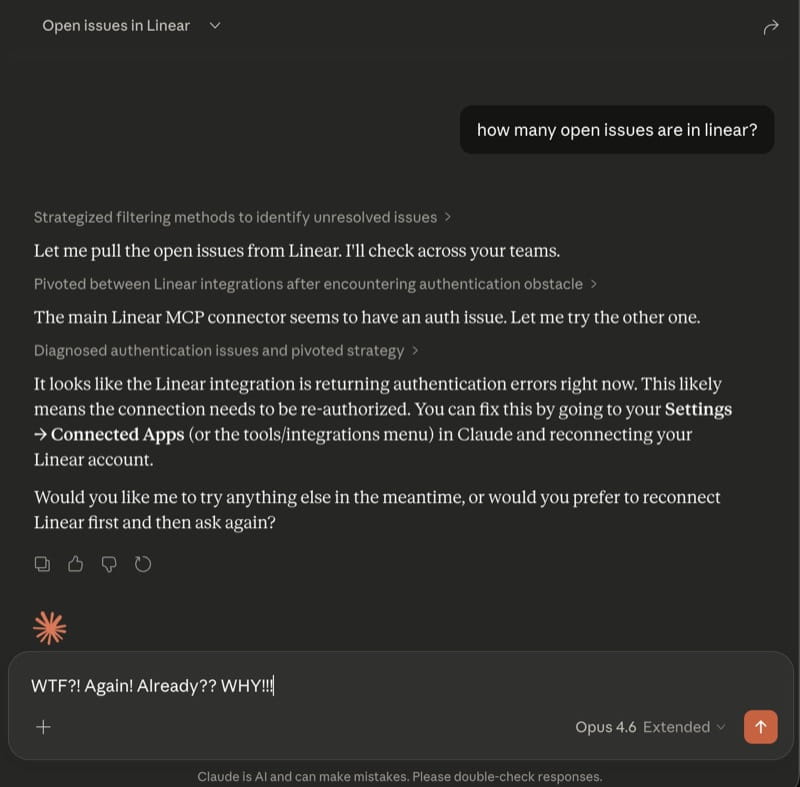
Sound familiar?
MCP connections use OAuth tokens that expire constantly. Every time they do, you stop what you're doing, re-authenticate, and lose your flow. Some services don't even support OAuth in MCP clients — they need API keys configured manually. Bindify fixes this permanently.
// You're not alone
This isn't a niche problem. These issues have been open for months:
Until MCP clients fix token refresh, Bindify is the workaround that actually works. Read the full breakdown →
// How it works
Create a Bindify connection
Sign up at bindify.dev, go to dashboard, add a connection to your service (Linear, Atlassian, etc…).
Authorize with your service
Sign in to your service once to authorize Bindify to connect. Bindify never sees your username or password.
Add your connector to your MCP client
Copy your secret URL and paste it into your MCP client — Claude.ai, Claude Desktop, Claude Code, Cursor, or any client that supports remote server URLs. API keys also available for CLI tools.
Done. Never re-authenticate again.
Bindify manages connections, tokens, and re-auth permanently. You just use your tools.
// Use API keys everywhere
Many service providers offer API keys as a simple, reliable way to authenticate — and some, like Atlassian, only offer API keys. But most AI chat tools like Claude.ai, ChatGPT, and their mobile apps don't support API key authentication. Bindify bridges the gap: securely store your API key with Bindify, and get a magic URL you can paste into any AI chat client to connect instantly — no manual configuration, no expired tokens, just seamless access on desktop and mobile.
// Supported services
// Pricing
Pay As You Go
- First 2 connections: $2/ea
- Additional: $1/ea
- All features included
// Security
Zero-knowledge encryption by default. Your OAuth tokens are encrypted with AES-256-GCM using keys only you hold. 512 bits of randomness in every secret URL — guessing one is as likely as winning the Powerball 18 times in a row. Tokens refresh on-demand when you use your connection.
// Frequently asked questions
> Why does Claude keep asking me to re-authenticate my MCP connections?
Claude's MCP implementation doesn't reliably refresh OAuth tokens when they expire. Instead of renewing the token in the background, it breaks the connection and forces you to manually re-authorize. This is a known bug affecting Claude Desktop, Claude.ai, and Claude Code users since mid-2025.
> Does Bindify work with Claude.ai (web)?
Yes. Bindify is the only solution that works with Claude.ai web. Other proxies still require Claude to complete an OAuth handshake to connect. Bindify's secret URL approach removes Claude from the OAuth equation entirely.
> Is it safe to store my OAuth tokens with Bindify?
Tokens are encrypted with AES-256-GCM. The decryption key exists only in your secret URL — Bindify never stores it. Even a full Bindify database compromise would yield only unreadable ciphertext.
> What happens if Bindify goes down?
Bindify runs on Cloudflare's global edge network (200+ locations). You can also delete your connection and reconnect directly to the service at any time — you're never locked in.
> Does Bindify work with Cursor, Open WebUI, or other MCP clients?
Yes. Bindify works with any MCP client that supports remote server URLs — including Cursor, Open WebUI, Claude Desktop, Claude Code, and Claude.ai.
> I replaced a connection with a new secret URL, but Claude is still failing. What do I do?
Claude caches MCP server configuration per session. If you replace a connection and reuse the same server name, any running Claude instance will keep using the old (now invalid) URL. Quit and restart all Claude instances — Desktop, web, and mobile — after replacing a connection. After restarting, Claude will load the updated URL automatically.