Todoist MCP Token Expired — Permanent Fix
You're here because Todoist keeps disconnecting from Claude. Here's why it happens and how to stop it permanently.
// What's causing this error
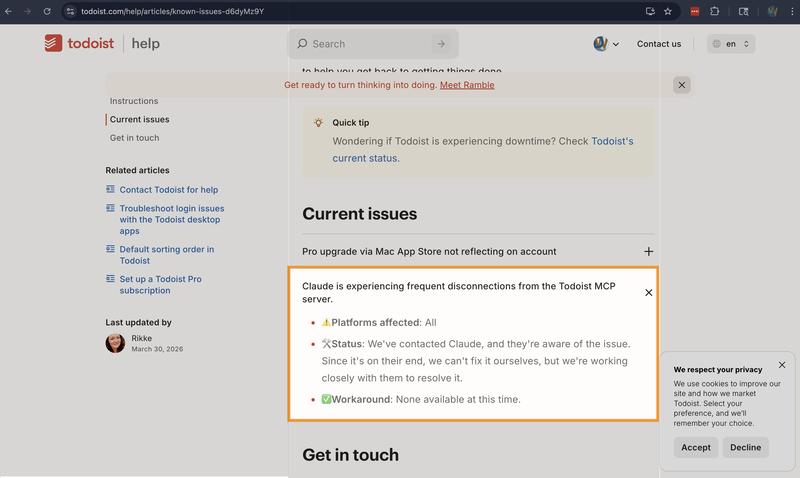
Source: Todoist Known Issues — confirms the problem with no workaround.
Here's the irony: Todoist OAuth tokens are permanent. They don't expire on a timer. But MCP clients don't know that. The client assumes every OAuth token needs periodic refreshing, attempts a refresh, finds no refresh token (Todoist doesn't issue them), treats the failure as a revocation, and discards your perfectly valid access token.
The token was fine. The client threw it away.
// The permanent fix
Bindify eliminates the problem in three steps:
- You authorize Todoist once through Bindify. Bindify securely stores your OAuth credentials with zero-knowledge encryption.
- Bindify gives you a permanent MCP URL. You paste this URL into Claude's MCP config. It never changes and never expires.
- Bindify keeps your token safe. Every request from Claude flows through Bindify's proxy, which holds your Todoist token securely and never discards it. No failed refresh attempts, no lost credentials. You never see an auth error again.
// Why this keeps happening
Most OAuth services issue short-lived access tokens alongside a refresh token. MCP clients are built around this pattern: when a token nears expiry, use the refresh token to get a new one. Todoist breaks this assumption — it issues a permanent access token with no refresh token at all.
When an MCP client's refresh logic kicks in and finds no refresh token, it interprets this as a failed auth state and discards the access token. The result is the "token expired" error you keep seeing, even though the token was never actually expired.
Your token can also become genuinely invalid if you change your Todoist password or manually revoke access — but the day-to-day disconnections are almost certainly the refresh-loop problem, not actual revocation.
For a deeper dive into why this is a systemic MCP problem, read Why every MCP OAuth integration breaks.
// Set up takes 2 minutes
The full walkthrough covers creating your Bindify account, connecting Todoist, and pasting your permanent URL into Claude's config. Start to finish, it takes about two minutes.