How Steve Reitz Uses Claude and Todoist to Run Eight Projects Without Losing His Mind
2026-04-04 · 7 min read
Steve Reitz is a prolific developer and poet (armyrunner-studios.com, stevereitz.substack.com, YouTube) — and he has a lot of irons in the fire.
He maintains six puzzle and game apps, two productivity apps (one currently in active development), and three AI-powered websites including a neurodivergent-focused learning tool designed to help students interpret tone and feeling in written text. On top of all that, he writes poetry, produces short-form videos, and runs a daily TikTok scriptwriting pipeline.
Managing all of it was a constant headache. No matter how much he worked, it felt like he wasn't making real progress on any single thing.
Then Steve built something clever with Claude Cowork.
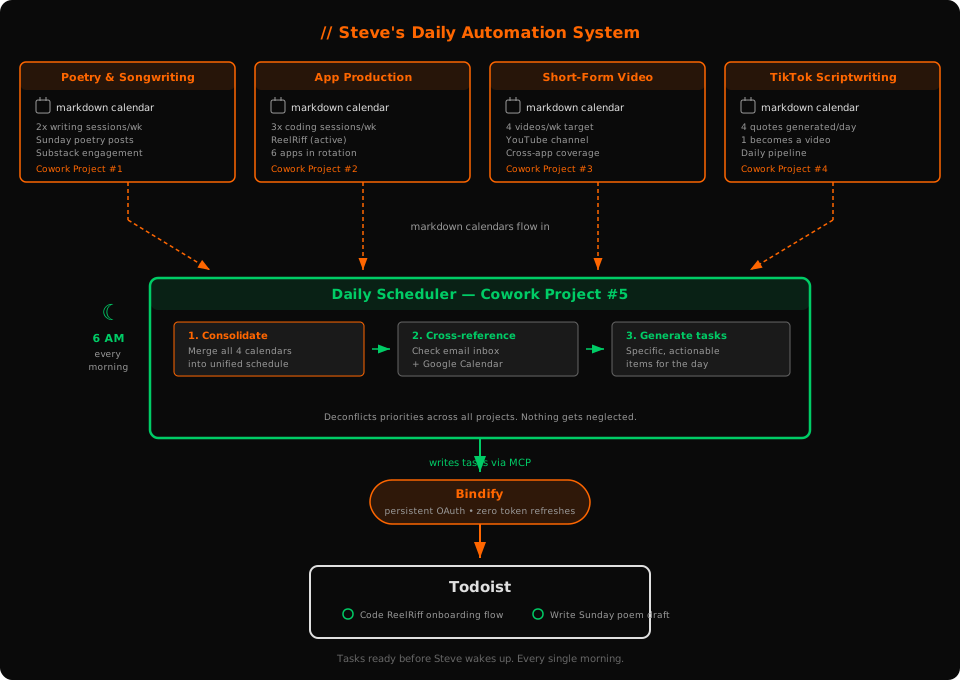
// the architecture: four workstreams and one master conductor
Steve has four active Cowork projects, each focused on a distinct creative or professional track:
- Poetry & Songwriting — managing his writing practice, with a goal of at least two focused sessions per week, plus regular Substack posts (poetry on Sundays, engagement-driving posts throughout the week)
- App Production — currently centered on ReelRiff, with plans to spin up additional projects as he reactivates his other apps
- Short-Form Video Content — planning and scheduling videos for his YouTube channel, targeting four per week across his apps and websites
- TikTok Scriptwriting — including a recurring task that generates four new motivational quotes every day, one of which typically makes it into a video
Each of these projects contains a markdown calendar — a simple document outlining Steve's goals and minimum commitments for that track throughout the week. Think of it as a contract he makes with himself: at least three coding sessions, at least two songwriting sessions, videos every other day, and so on.
// the lynchpin: a fifth project that ties it all together
Here's where it gets genuinely elegant. Steve took all four of those individual markdown calendars and fed them into a fifth Claude project to generate a master schedule — a single unified view of all his commitments and priorities across every project.
The fifth Cowork project acts as his daily scheduler. Each morning, this project automatically looks at three inputs simultaneously:
- His email inbox
- His calendar
- The master schedule
From those three sources, it generates his Todoist tasks for the day — not generic placeholders, but specific, meaningful actions tailored to where each project actually stands.
“Before, I had generic stuff plugged into Todoist that I would check off whether I finished it or not. Now that I have a tailored schedule, with tasks updated daily, I feel infinitely more productive because I am actually getting meaningful stuff DONE.”
The daily scheduler deconflicts everything automatically. Steve makes progress on multiple projects every single day without feeling overwhelmed, and nothing gets neglected.
// where Bindify came in
There was one problem: the whole system depended on that fifth Cowork project writing to Todoist every morning via MCP. At first, it couldn't do that reliably.
The Todoist MCP connector would drop its OAuth token regularly, silently breaking the pipeline. This is a known issue with Claude that we've covered thoroughly in MCP OAuth is broken and in our Claude + Todoist workflow guide. Steve's carefully designed automation would fail overnight, and he'd wake up to a stale Todoist and no clear direction for the day.
Once he connected Todoist through Bindify, the token stayed persistent. The daily scheduler fires every morning without interruption. The tasks are there when he needs them.
“It is all because Bindify keeps my OAuth token persistent daily, keeping me from having to manually refresh it — where it didn't when I was just using the Todoist connector. Now my recurring task is truly automated.”
// why this matters
Steve's setup is a glimpse of where AI-assisted productivity is heading. The individual pieces — Claude, Todoist, Cowork mode, MCP — are all available today. The hard part isn't any one tool. It's making them work together reliably enough that you can build real workflows on top of them.
That's the gap Bindify fills. Not by replacing any of these tools, but by making the connections between them durable enough to trust. When your morning automation runs at 6 AM and you're still asleep, “it usually works” isn't good enough. It has to work every time.
Steve's system works every time now. Eight projects, one daily schedule, zero manual token refreshes.
5-day free trial. No credit card required.